Features
Budgeting
A flexible budgeting app with category limits, review-first transaction workflows, and a clear plan for narrow merchant rules when they launch.
The short answer
What budgeting does for you
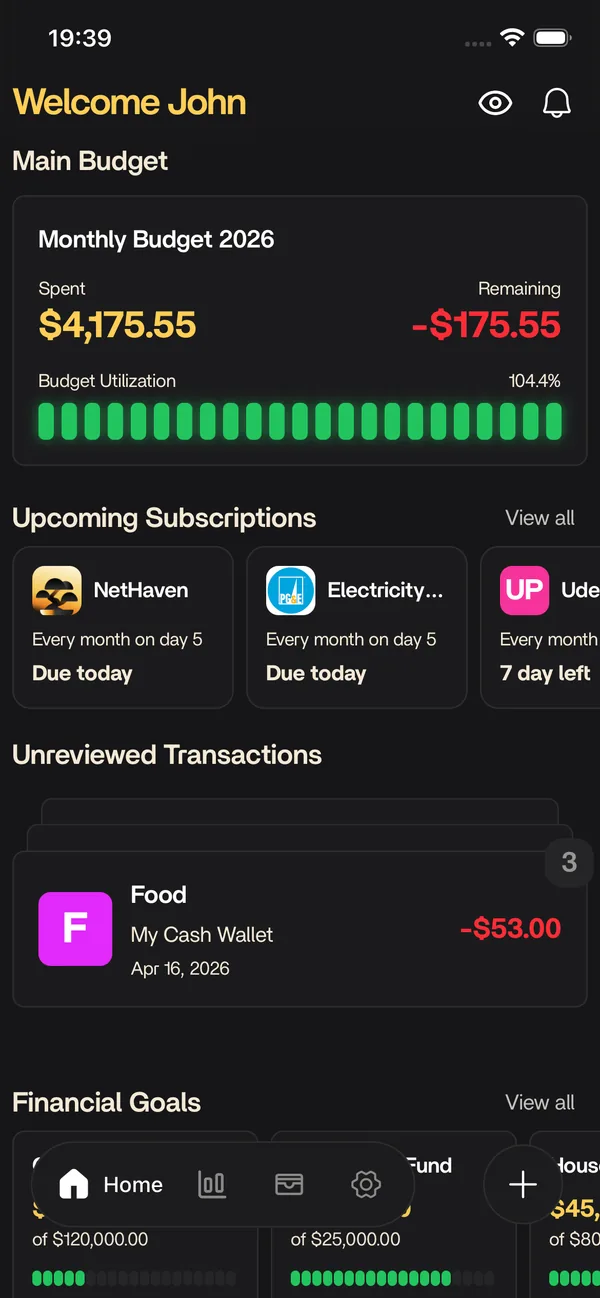
Use Nethaven to set a monthly limit for each category, review the transactions you add or import, and see spending against the plan beside debt, savings goals, subscriptions, and net worth. A household can share one budget while each person keeps a separate login. Manual accounts, CSV imports, and receipt or bank-screenshot scans are supported today; live bank sync and automatic transaction rules are still on the roadmap.
Looking for the next step? How to create a budget puts this feature in context with the rest of Nethaven.
September 2026 · Main budget
Make the next money decision obvious.
Set category limits, review exceptions, and keep a household plan that both people can see.
Spent this month
$2,223.06
89% of plan used
Review queue
1 item
Needs a decision
Category limits
Spending stays next to the boundary you set.
- Groceries82%
$412.36 spent of $500.00
- Housing100%
$1,400.00 spent of $1,400.00
- Transport58%
$184.50 spent of $320.00
- Dining out81%
$226.20 spent of $280.00
Product boundary: this is a product explanation with sample data, not a live account connection. Review imports and scans, and do not expect automatic bank categorization yet.
Illustrative USD sample data. This preview uses a manual or imported transaction and does not connect a bank. Live bank integration and automatic transaction rules are coming soon.
At a glance
What you get
- Manual accounts, CSV imports, and scan-assisted transactions
- Custom budget categories with monthly limits
- Spending vs. budget progress by category
- Review workflow for uncategorized transactions
- Narrow merchant-rule workflow planned for a future release
- Shared household budgets via separate logins
September 2026 · Main budget
Make the next money decision obvious.
Set category limits, review exceptions, and keep a household plan that both people can see.
Spent this month
$2,223.06
89% of plan used
Review queue
1 item
Needs a decision
You choose
Review one imported charge
Sainsbury's Local
$46.80 · Jun 14, 2026
Nethaven action
Keep the decision narrow
- Check the transactionReads the merchant, amount, date, and import source.
- Respect your decisionWaits for your category choice instead of guessing.
- Update the planChanges the budget only after you confirm.
A broad merchant match can hide exceptions. Narrow conditions preserve a useful review queue.
Result
See what changed
Waiting for your choice
No category total changes until you confirm the charge.
Honest preview
The sample result stays unchanged until you choose a category.
Product boundary: this is a product explanation with sample data, not a live account connection. Review imports and scans, and do not expect automatic bank categorization yet.
Illustrative USD sample data. This preview uses a manual or imported transaction and does not connect a bank. Live bank integration and automatic transaction rules are coming soon.
How it fits into Nethaven
Nethaven is a personal finance app for iOS and Android that connects brokerages through SnapTrade, crypto wallets, and manual assets into one dashboard. Budgeting is part of that unified view, so you are not exporting CSVs or reconciling separate tools every month.
Use categories and limits to stay on plan, then zoom out to net worth, debt payoff, savings goals, and subscriptions without losing context. Household invites let partners share an organization budget while each person keeps their own login.
Start with category limits that answer a real question
A useful budget tells you what a purchase means before the month is over. Create categories that map to decisions you actually make, then give each one a monthly limit. Groceries, housing, transport, subscriptions, debt, and savings are a practical starting set; you can add detail when it changes your next choice.
Nethaven compares category spending with the limit as the month progresses. The sample preview above uses $500 for groceries and $320 for transport, so the remaining amount is visible instead of hidden in a total. The numbers are illustrative, but the workflow is the point: set the boundary, inspect the transactions behind it, and adjust a category when your plan is consistently unrealistic.
Keep a review queue for transactions that need judgment
Budget totals are only as useful as the transactions behind them. Transactions you add manually, import from a CSV, or capture from a receipt or bank screenshot should get a quick review before you rely on a category total. Confirm the date, merchant, amount, category, and whether the row is a transfer, refund, or duplicate.
A visible review queue is more honest than a finished-looking total built from guesses. Categorize a clear grocery charge, leave a mixed-use marketplace purchase undecided, and correct transfers before they inflate spending. This review-first habit takes less time than repairing a month of reports after an over-broad shortcut has hidden the exceptions.
Use narrow transaction rules when the feature is available
Transaction rules are planned around a narrow promise: remove repeated decisions only when the same merchant reliably means the same category. A rule for a streaming service, rent payment, or regular utility is easier to trust than a rule for a warehouse club that could be groceries, household supplies, or a gift.
The interactive preview shows the intended sequence without pretending to run automation today. You choose a category, Nethaven keeps the decision visible, and a rule preview can be scoped to one merchant and one category. Automatic transaction rules and live bank integration are still coming soon, so the current product does not silently categorize a bank feed in the background.
Share the plan without sharing a password
Household organizations let couples and families work from one budget while each person uses their own login. Both members can see the same category limits and progress, and either person can review the transactions that belong in the shared plan. That turns budgeting into a shared routine instead of one person's private spreadsheet.
Separate logins do not mean every account must be shared. Each member can keep the accounts they add attached to the right owner while contributing the agreed categories and limits to the household view. The shared budget shows the plan; the account permissions still matter.
Know what Nethaven supports today
Nethaven budgeting is usable today with manual accounts, CSV transaction imports, and receipt or bank-screenshot scans. Those paths are intentionally visible in the product because they let you bring in the data you need without claiming that a live bank connection is already available. Institution coverage, scan quality, and CSV column formats can vary, so review the imported result before trusting a report.
Live bank integration and automatic transaction rules are on the roadmap. Until they launch, treat the preview's rule step as an explanation of the planned interaction, not as a promise that Nethaven will fetch or categorize bank activity for you. The same dashboard can still connect a careful monthly budget with debt payoff, savings goals, subscriptions, and net worth.
Know before you start
Current product limitations
Manual-first today
Use manual accounts, CSV imports, and receipt or bank-screenshot scans for budgeting data. Live bank integration is coming soon.
Rules are planned
Nethaven is designed around narrow merchant matches, but automatic transaction rules are not available yet. The preview shows the intended workflow only.
Review still matters
Check imported rows, transfers, refunds, and duplicates before trusting category totals. Scan quality and CSV formats vary.
Data sync depends on institution availability. Check the in-app connection flow for brokerages supported in your region. Not investment advice.
FAQ
Questions before you start
Keep exploring
Related resources
Free to download
Track it automatically in Nethaven
Budgets, net worth, debt, goals, and subscriptions stay current on iOS, Android, and web instead of living in a spreadsheet.