Features
Subscriptions
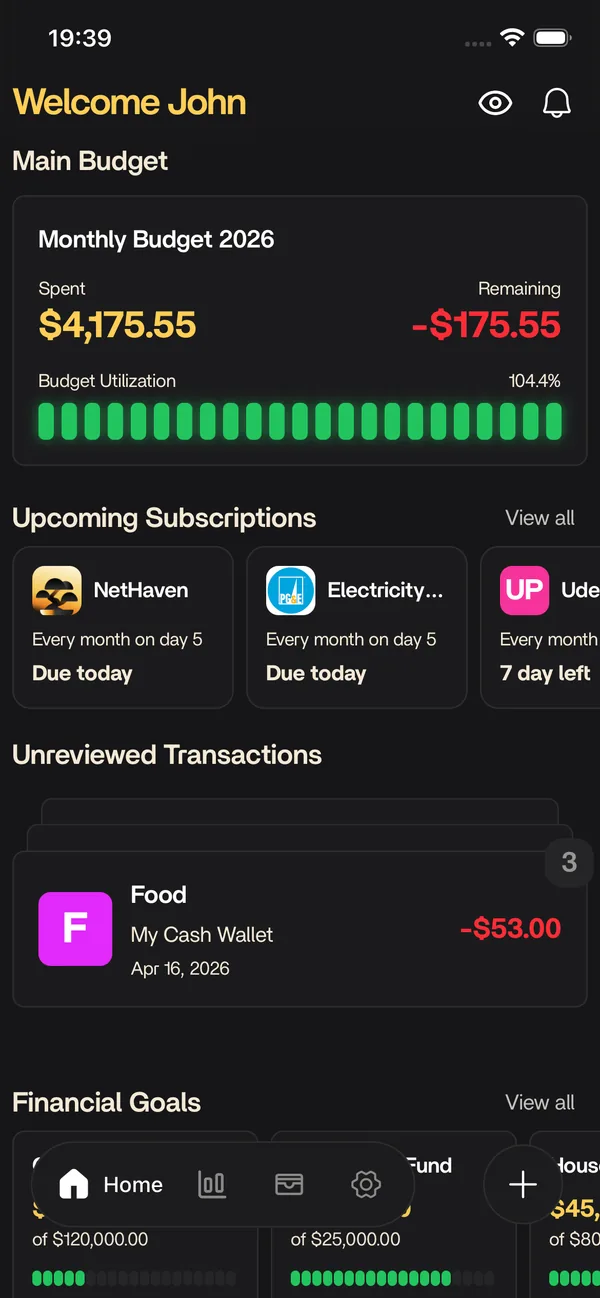
Subscription tracker that detects recurring charges from synced transactions, shows upcoming renewals and annual costs, and keeps manual entries in one list.
The short answer
What subscriptions does for you
Nethaven finds recurring charge patterns in synced transactions, presents possible subscriptions for review, and shows each next renewal plus an annualized cost estimate. Manual subscriptions can fill gaps when an institution is unsupported. Detection depends on the transaction history available, and Nethaven cannot cancel subscriptions, negotiate rates, or guarantee what a merchant will charge.
Looking for the next step? Calculate your annual subscription costs puts this feature in context with the rest of Nethaven.
At a glance
See the cost of recurring commitments
Nethaven groups recurring charges so you can spot the monthly pattern before it becomes background noise.
$108
6
$18
Illustrative sample data. Synced rows come from recurring transaction patterns, manual rows remain clearly labeled, and annual costs are estimates. Nethaven cannot cancel or negotiate subscriptions for you.
At a glance
What you get
- Recurring charges detected from synced transactions
- Upcoming renewals and next-charge dates
- Annualized cost per subscription
- Price-increase awareness across billing cycles
- Subscriptions tied to the accounts that pay them
Review the next charge
Check the date, amount, and source
Explore the renewal calendar, then filter the underlying rows when a recurring pattern needs your judgment.
October 2026
Streamline Music
ExpenseOct 28
$13
CloudBox Pro
ExpenseOct 31
$120
FitLab
ExpenseOct 2
$34
Newsroom Plus
ExpenseOct 10
$9
Design Suite
ExpenseOct 23
$239
Review your recurring charges
Renewals due in the next 30 days
| Subscription | Type | Schedule | Budget | Expected | Transactions |
|---|---|---|---|---|---|
SM Streamline Music Entertainment | Expense | Monthly Day 28 | Entertainment | $13 | 12 |
CP CloudBox Pro Software & apps | Expense | Yearly Day 31 | Software | $120 | 12 |
F FitLab Health & fitness | Expense | Monthly Day 2 | Fitness | $34 | 12 |
NP Newsroom Plus Education | Expense | Monthly Day 10 | News | $9 | 12 |
Streamline Music
Monthly on day 28
$13
CloudBox Pro
Yearly on day 31
$120
FitLab
Monthly on day 2
$34
Newsroom Plus
Monthly on day 10
$9
What this preview can and cannot know
Synced rows are based on transaction history from the connected account. Manual rows are entered by you. Nethaven can surface a pattern, estimate an annual cost, and highlight a change, but it cannot cancel a service, negotiate a price, or promise what a provider will charge next.
Illustrative sample data. Synced rows come from recurring transaction patterns, manual rows remain clearly labeled, and annual costs are estimates. Nethaven cannot cancel or negotiate subscriptions for you.
How it fits into Nethaven
Nethaven is a personal finance app for iOS and Android that connects brokerages through SnapTrade, crypto wallets, and manual assets into one dashboard. Subscriptions is part of that unified view, so you are not exporting CSVs or reconciling separate tools every month.
Use categories and limits to stay on plan, then zoom out to net worth, debt payoff, savings goals, and subscriptions without losing context. Household invites let partners share an organization budget while each person keeps their own login.
How Nethaven detects recurring charges
Nethaven starts with transactions from accounts you have connected. It looks for a merchant that appears more than once with a recognizable cadence and amount, then surfaces that pattern as a possible recurring charge. The result is a reviewable candidate with a next-charge date, the account it came from, and a cost estimate, not a black-box promise that every charge was identified perfectly.
Detection works best after an account has enough transaction history to show a pattern. A new subscription, a provider that changes its billing descriptor, an introductory price, or a skipped cycle can make a match uncertain. Nethaven keeps those cases visible for review instead of presenting an estimate as a fact.
Review what renews before it hits
Ask what renews in the next 30 days, switch to the upcoming view, and scan the next-charge dates in one place. Open any row to see the merchant, cadence, source account, and why it was flagged. If an amount changed, the review queue gives you a specific decision to make before the next renewal rather than making you hunt through statements.
The review step is where your judgment stays in the loop. Mark a charge reviewed when the match is right, leave it open when the merchant or cadence needs checking, and use the annual total to decide which recurring costs deserve a closer look. The subscription cost calculator is useful for a separate what-if calculation alongside the live list.
Synced and manual subscriptions have different boundaries
A synced subscription is discovered from transactions that arrive through a connected bank or card account. Its amount and dates reflect what Nethaven has observed in that account. A manual subscription is one you enter yourself, which is useful for an unsupported institution, a cash payment, or a charge that has not appeared in the available history, but it will not become an automatically verified bank pattern until matching transactions are synced.
This distinction matters when you compare the subscriptions view with your budget. Bank and credit account sync determines which transactions are available to detect, while budgeting and transaction rules helps you keep the resulting charges categorized with the rest of your spending.
What the annual cost estimate means
Nethaven annualizes the latest observed amount using the recorded cadence. A monthly charge is projected across twelve cycles, while an annual charge uses the latest annual amount. That gives you a useful planning number and a clear way to compare services, but taxes, add-ons, discounts, skipped cycles, and future price changes can make the next statement different.
Nethaven is a tracker and review surface, not a cancellation service. It can call attention to a renewal and show the information you need to decide what to do, but it cannot cancel a subscription, negotiate with a provider, or stop a merchant from charging an account. Any cancellation or price discussion still happens with the provider.
Know before you start
Current product limitations
Detection needs a pattern
Recurring-charge detection depends on enough synced history and a recognizable merchant, amount, and cadence. Ambiguous or newly started charges can need review.
Synced and manual data differ
Connected accounts can surface recurring charges automatically. Manual entries fill gaps, but they are not verified against a bank feed until matching transactions arrive.
Estimates are not actions
Annual costs use the latest amount and cadence. Nethaven can flag renewals, but it cannot cancel subscriptions, negotiate rates, or guarantee a merchant's next charge.
Data sync depends on institution availability. Check the in-app connection flow for brokerages supported in your region. Not investment advice.
FAQ
Questions before you start
Keep exploring
Related resources
Free to download
Track it automatically in Nethaven
Budgets, net worth, debt, goals, and subscriptions stay current on iOS, Android, and web instead of living in a spreadsheet.